Chat


Re: Chat
За ямарч бсан яахуу, чанга үнэтэй юм тэ, энэ жишээгээр бол бусад машинууд үнэ нь алсаан алсан
1300cc MT ff
1300cc MT ff
1500cc MT awd
2000cc AT awd
1300cc MT 4wd
1800cc AT 4wd
2000cc AT awd
2000cc turbo MT awd
2500cc AT rwd
4000cc AT awd
2000cc turbo AT awd
1300cc MT ff
1500cc MT awd
2000cc AT awd
1300cc MT 4wd
1800cc AT 4wd
2000cc AT awd
2000cc turbo MT awd
2500cc AT rwd
4000cc AT awd
2000cc turbo AT awd
-
Egu

- Posts: 2773
- Joined: Sun Nov 20, 2011 10:17 pm
- Car: VW Bora mk4 2003 VR5 Tiptronic AT SOLD
VW Golf GTI mk4 2003 Tiptronic AT SOLD
Subaru Forester SG5 2003 MT5 SOLD
Toyota Vanguard 2008 3.5 V6 AT SOLD
Subaru Impreza GDB 2002 MT6
Toyota Altezza SXE 1999 MT6
Re: Chat
Tsaanaasaa EJ20 NA gardiin bnalee uugaasaa teriig ni l neg gar medehgui avchihgui yu hehe tegeed WRX gej bodood l baigaa baih ternees bish zugeer l 2.0 Impreza. WRX STi gesen bichgel baihgui bgag anzarch bga baih
Toyota Corolla Levin ae85 1983 AT


Re: Chat
nadaa neg iim relay bnaa eniig bi radiator deeree nemelt sens tawisiin teged oilgodoguiee haha sensnii 2 utasiig haana ni ogood haana ni togiig (12V) ni owoh we

Mark 2 1jzgte
-
Ochki

- Admin
- Posts: 6978
- Joined: Tue Nov 08, 2011 12:58 pm
- Car: өвгөн бэнз w123
заримдаа онгирогчдын машин sg5 xt
greenland 105 maybe 102.5 - Link: http://www.maf.mn
- Location: Ulaanbaatar
- Contact:
Re: Chat
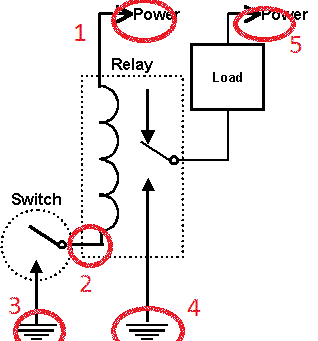
1 /86/ - +12v
2 /85/ - fwd to 3
3 - gnd /ih biye/
4 /30/ - gnd /ih biye/
5 /87/ - +12V
Load - sens chin bairlana.
sensni herglenees shaltgaalj 4 bolon 5-d load-d zalgah utasnuud-g huchiig ni taarulj songono, 5-n utassand tohiroh gal hamgaalagchig tavina.
Dairaldsnaa unaal yavjina
-
CaptMONGOL
- Posts: 228
- Joined: Thu Dec 01, 2011 11:55 pm
Re: Chat
Minii nuuts khuu geed jujigiig uzeh yumsan, deer TV-r garch bhad ni dutuu uzchihsen. Urlag.mn deer baliar bichlegtei yum bhiin. haanaas olj awah we?
----------------------------
DO IT YOURSELF
Toyota Crown JKS 175
Toyota Prius NHW20 ---- SOLD
Toyota Prius NHW10 ---- SOLD
DO IT YOURSELF
Toyota Crown JKS 175
Toyota Prius NHW20 ---- SOLD
Toyota Prius NHW10 ---- SOLD

Re: Chat
ochij sonirhoh bodoltoi baina.Naba wrote:За энэ хагассайнд VIP клубээс зохиож буй JZX Mongolia-ын хаалтын драг уралдаан болох тул явах сонирхолтой хүмүүс хагассайны өглөө 10.30-д Бадка-ын ажил буюу хүнсний 1-ийн урд АЛФА төвийн үүдэнд цуглъя! Асуух зүйл байвал 99067142 надруу ярина уу!


Re: Chat
If you're using your Samsung Galaxy Tab for the first time, you can easily select the Wi-Fi network you'd like to join using the setup manager.
When you opt in for either Mobile Network or Wi-Fi, or just Wi-Fi, the Galaxy Tab will by default try to connect to a Wi-Fi network near you.
Select the network you wish to connect to, enter the password if required and you're set up.
If you want to change the settings, or set it up for the first time, you can do this through the Settings menu.
Note: If you're attempting to access a network-based page or app, you may be required to set up a new Wi-Fi connection. When prompted, select the option to set up a new connection.
Access the Wi-Fi settings menu by navigating to the Wireless & networks menu
Select Wi-Fi settings
Choose a listed network, or add a hidden network by selecting Add Wi-Fi network
If you choose one of the listed networks and it's secured, enter the password, press Connect and you'll be connected to that network
If you wish to access a hidden network, select Add Wi-Fi network and enter the SSID
If a password is required, you'll be prompted to enter this before connecting
If Wi-Fi is turned off, you can now turn this on by ticking the box in the Wireless & networks menu.
When you opt in for either Mobile Network or Wi-Fi, or just Wi-Fi, the Galaxy Tab will by default try to connect to a Wi-Fi network near you.
Select the network you wish to connect to, enter the password if required and you're set up.
If you want to change the settings, or set it up for the first time, you can do this through the Settings menu.
Note: If you're attempting to access a network-based page or app, you may be required to set up a new Wi-Fi connection. When prompted, select the option to set up a new connection.
Access the Wi-Fi settings menu by navigating to the Wireless & networks menu
Select Wi-Fi settings
Choose a listed network, or add a hidden network by selecting Add Wi-Fi network
If you choose one of the listed networks and it's secured, enter the password, press Connect and you'll be connected to that network
If you wish to access a hidden network, select Add Wi-Fi network and enter the SSID
If a password is required, you'll be prompted to enter this before connecting
If Wi-Fi is turned off, you can now turn this on by ticking the box in the Wireless & networks menu.